 Gookit
Coming soon to the Woo Marketplace
Barcode labels for WooCommerce.
Connect your WooCommerce store, choose the products and variations you need, and download a single print-ready PDF. Each variation’s label shows its own SKU and barcode.
Free for up to 200 labels a month, with the same designer and fields as Pro. Requires WooCommerce 5.0 or later.
Two ways to install.
Both connect your store to the same BarcodeMan workspace. They differ in where you download the plugin and who bills you.
-
Woo Marketplace
Coming soonDownload the plugin from your WooCommerce.com account. WooCommerce.com bills you for Pro.
The listing is in review. Install from WordPress.org today.
-
WordPress.org
Available nowSearch for Barcode Man under Plugins > Add New in your WordPress admin. It is free to install, and Gookit bills you for Pro through Stripe.
Install from WordPress.org
From WooCommerce products to printed labels.
- 01
Connect your site
Open WooCommerce > Barcode Man, sign in to BarcodeMan and approve the WooCommerce authorization screen. A site administrator connects the site once.
Connect your store - 02
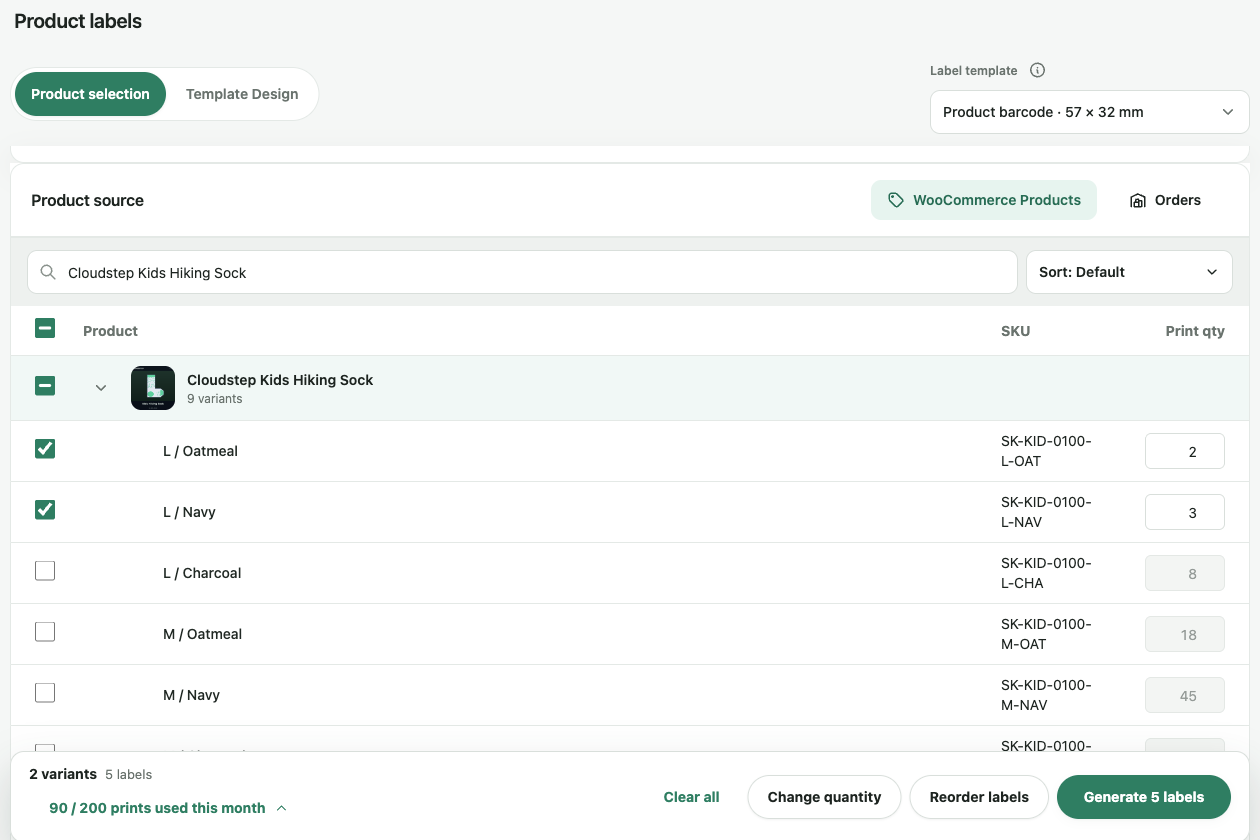
Pick variations and quantities
Search your catalog, tick the variations you need and set a quantity for each. To print address labels, start from your orders instead.
Print product labels - 03
Generate one PDF
Check each label in the preview, then download a PDF laid out for your label paper. Print it at 100% scale.
Printer setup
Your catalog, on the label.
Each variation prints its own name, SKU and image, so sizes and colours are easy to tell apart. WooCommerce’s barcode field prints as a retail barcode with leading zeros kept. Prices come from your store each time you print. The SKU generator fills in missing SKUs after you check a preview.
Your store stays yours.
-
Nothing on your storefront
The Barcode Man plugin connects your site to BarcodeMan. The label designer opens in its own browser tab, and your store pages stay as they are.
-
Your products stay as they are
Printing never touches your products. The only thing BarcodeMan writes back is a SKU you confirm in the SKU generator preview.
-
No API key kept in WordPress
WooCommerce creates the connection key and sends it straight to BarcodeMan. Disconnect from WooCommerce > Barcode Man at any time.
Common questions.
What does my site need?
WordPress 5.8 or later, WooCommerce 5.0 or later and PHP 7.4 or later. Your site cannot use Plain permalinks, and a site administrator connects it to BarcodeMan.
Which version should I install?
WordPress.org, for now. The Woo Marketplace version is coming soon. Both connect your store to the same BarcodeMan workspace and print the same labels. They differ in where you download the plugin and who bills you. Pick one for your site and stay with it.
How much does it cost?
Nothing to start, on either version. Free gives you 200 labels a month with the same designer, fields and barcode formats as Pro. Pro gives you unlimited labels for $7.99 a month. Gookit bills Pro through Stripe on the WordPress.org version, and WooCommerce.com bills it on the Woo Marketplace version. You see the plans before you subscribe.
Does it read WooCommerce’s barcode field?
Yes. BarcodeMan reads the GTIN, UPC, EAN or ISBN field that WooCommerce added in 9.2, for each product and each variation, and keeps leading zeros. It does not read barcodes stored in custom fields or in other plugins’ fields.
Will it change my products?
Not unless you say so. The SKU generator shows you a preview of new SKUs and only saves them after you confirm. Printing labels never touches your products.
Can a Shop Manager print labels?
Yes, once a site administrator has connected your site. Only an administrator can connect or disconnect it.
Step-by-step guides are in the help center.
Print your first WooCommerce labels.
200 labels a month, free.