 Gookit
Label templates
Identify roll, multi-column (2-up), and sheet label paper, then choose the matching BarcodeMan template guide.
On this page
A label template is a reusable design that fills in your store data, such as product names, prices, and barcodes. Start by identifying the paper you will print on, then choose one of BarcodeMan’s three template types: roll, multi-column, or sheet.
Identify your label type
Look at the backing paper and the edges of the individual stickers.
- Separate, flat sheets: choose a sheet label template.
- A roll with one label in each repeating position: choose a roll label template.
- A roll with several labels in each repeating group: choose a multi-column label template. The stickers may be side by side or stacked in a 2-up arrangement.
Count the physical stickers, not the text or barcode elements in your design. One sticker with two text columns is still one label.
Roll labels
Roll labels come on continuous backing paper wound around a spool. For a standard roll template, each repeating position contains one sticker.
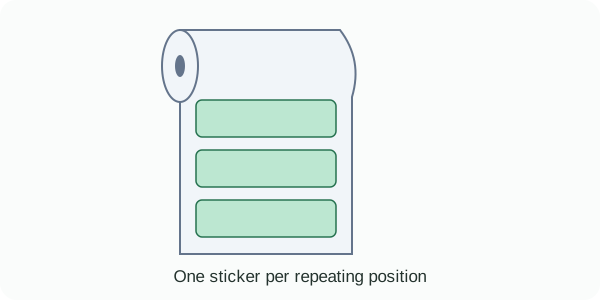
Measure one label’s width and height, or check its dimensions on the packaging. For example, a 57 mm × 32 mm sticker needs a template that matches that individual label size.
Multi-column labels
Multi-column labels also come on a roll, but contain multiple separate stickers in each repeating group. They may be described as 2-up or side-by-side labels.
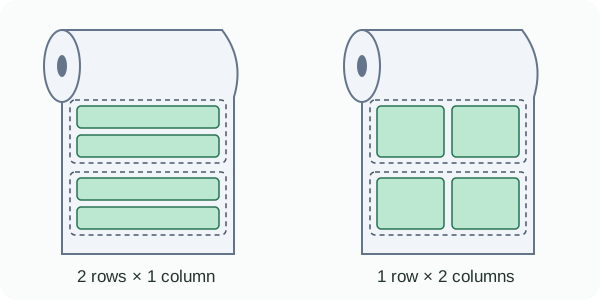
The dashed outlines mark repeating groups; each green rectangle is one physical sticker. Both arrangements use a multi-column template:
- 2 rows × 1 column: two separate stickers stacked from top to bottom in each group.
- 1 row × 2 columns: two separate stickers placed left to right in each group.
Rows and columns describe the arrangement within a repeating group, not all the labels along the roll. Two lines of text inside one sticker do not make a two-row layout. Match the physical arrangement, individual label dimensions, and gaps when setting up the template.
Create a multi-column label template
Sheet labels
Sheet labels come on separate, flat sheets of backing paper, usually with pre-cut stickers arranged in a grid. Common sheet sizes include A4 and Letter.
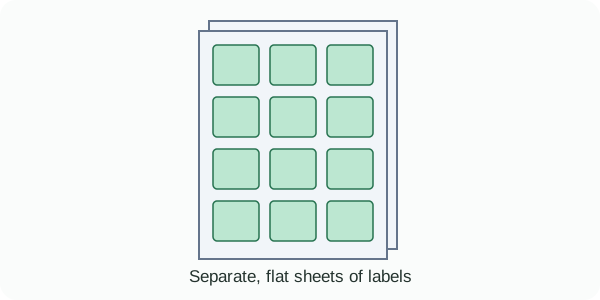
Check the label brand and product number on the packaging. The template needs to match the whole sheet size, individual label dimensions, rows, columns, margins, and gaps so the design lands inside each pre-cut sticker.
Create your template
- Identify your paper using the examples above and note its dimensions or product number.
- Open the matching template guide to configure the paper layout and add your label elements.
- Link the elements to your store data, preview the result, and save the template.
When you are ready to print, follow Printer setup. The paper size in the print dialog must match the PDF page produced for your label layout.
Questions about this article? Email our team.
Send feedback